비주얼 결과물은 한 번 만들기 쉽습니다.
어려운 것은 같은 결과물을 여러 번의 AI 수정 과정에서도 유지하는 것입니다. 매번 전체 HTML/CSS 구현을 프롬프트에 다시 넣는 방식은 비용이 크고 불안정합니다.

비주얼 문서에는 AI-native source가 필요합니다.
AI가 수정할 수 있고, 브라우저가 복원할 수 있는 비주얼 문서의 작은 원본.
AI가 제목, 지표, 섹션, 시각 강조 하나를 바꾸기 위해 전체 HTML/CSS 산출물을 다시 써야 할 이유는 없습니다. VMD는 비주얼 문서의 수정 가능한 의미와 렌더링 결과를 복원하는 replay 데이터를 분리합니다.
Before
With VMD
@doc "Revenue Brief" {
  spec: vmd@0.1
  fidelity: visual-lossless
  intent: executive-brief
}

::intent
purpose: AI가 비주얼 브리프를 계속 수정
editable: title, metrics, callouts, tone
::

@tokens.editable {
  accent: #c96442
}

@tokens.locked {
  title.line-height: 1.05
  grid.gap: 24px
}

::frame[role="overview" recipe="brief.workspace"]
  title: Revenue is compounding faster than account growth

  ::component.metric[label="Revenue" value="$842k"]
  change: +14.6%
  ::
::

@residual_index {
  affected:
    frame.overview.title:
      safe-edit: text-within-46-chars
      on-change: remeasure
}

@replay {
  encoding: visual-replay@0.1
}

@residual {
  mode: visual-lossless
  ai: ignore
}왜 필요한가
다음 문서 포맷은 모델이 읽기에 싸고, 브라우저가 복원하기에 정확하며, 매 수정 후 무엇이 바뀌었는지를 명시해야 합니다.
어려운 것은 같은 결과물을 여러 번의 AI 수정 과정에서도 유지하는 것입니다. 매번 전체 HTML/CSS 구현을 프롬프트에 다시 넣는 방식은 비용이 크고 불안정합니다.
텍스트, 레이아웃, cascade, 브라우저 예외, asset, fallback이 한곳에 섞입니다. 작은 문구 수정도 모델이 건드리지 말아야 할 구현까지 다시 쓰게 만듭니다.
글에는 좋지만, 설계된 페이지, 리포트, 덱, 대시보드를 대체할 만큼의 레이아웃, 토큰, replay, 복원 상태를 담지 못합니다.
무엇이 달라지는가
AI는 전체 DOM과 CSS cascade 대신 의도, 슬롯, 컴포넌트, 수정 가능한 토큰, 제약만 읽습니다.
무엇을 수정해도 되는지, 무엇이 잠겨 있는지, 수정 후 무엇을 다시 측정해야 하는지를 파일 안에 명시합니다.
렌더러는 lock, recipe, replay, residual, raw fallback 데이터를 사용해 고정 환경의 브라우저 출력을 복원합니다.
지금은 브라우저 페이지를 대상으로 하고, 이후 PDF, 덱, 디자인 산출물 렌더러로 확장될 수 있는 소스입니다.
예시 산출물
VMD는 사람들이 이미 알고 있는 산출물, 즉 리포트, 대시보드, 덱, 그리고 이후 PDF나 디자인 파일 렌더러까지 대체하고 보존할 수 있을 때 의미가 있습니다. 아래 예시는 이 source format이 목표로 삼는 비주얼 문서의 수준을 보여줍니다.
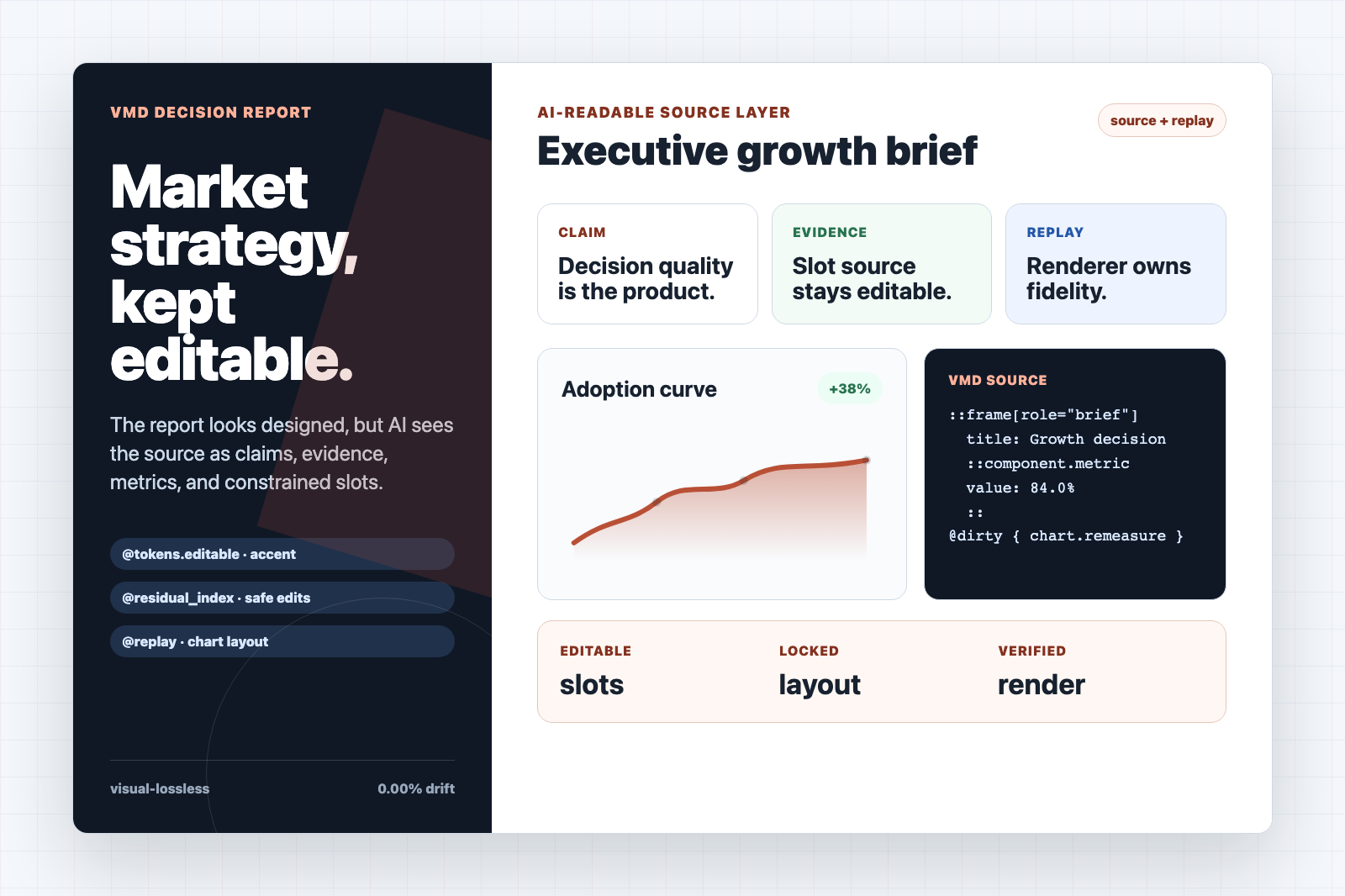
설계된 리포트의 주장, 지표, 차트, callout을 유지하면서 AI가 전체 HTML 페이지를 다시 쓰지 않고 수정할 수 있습니다.
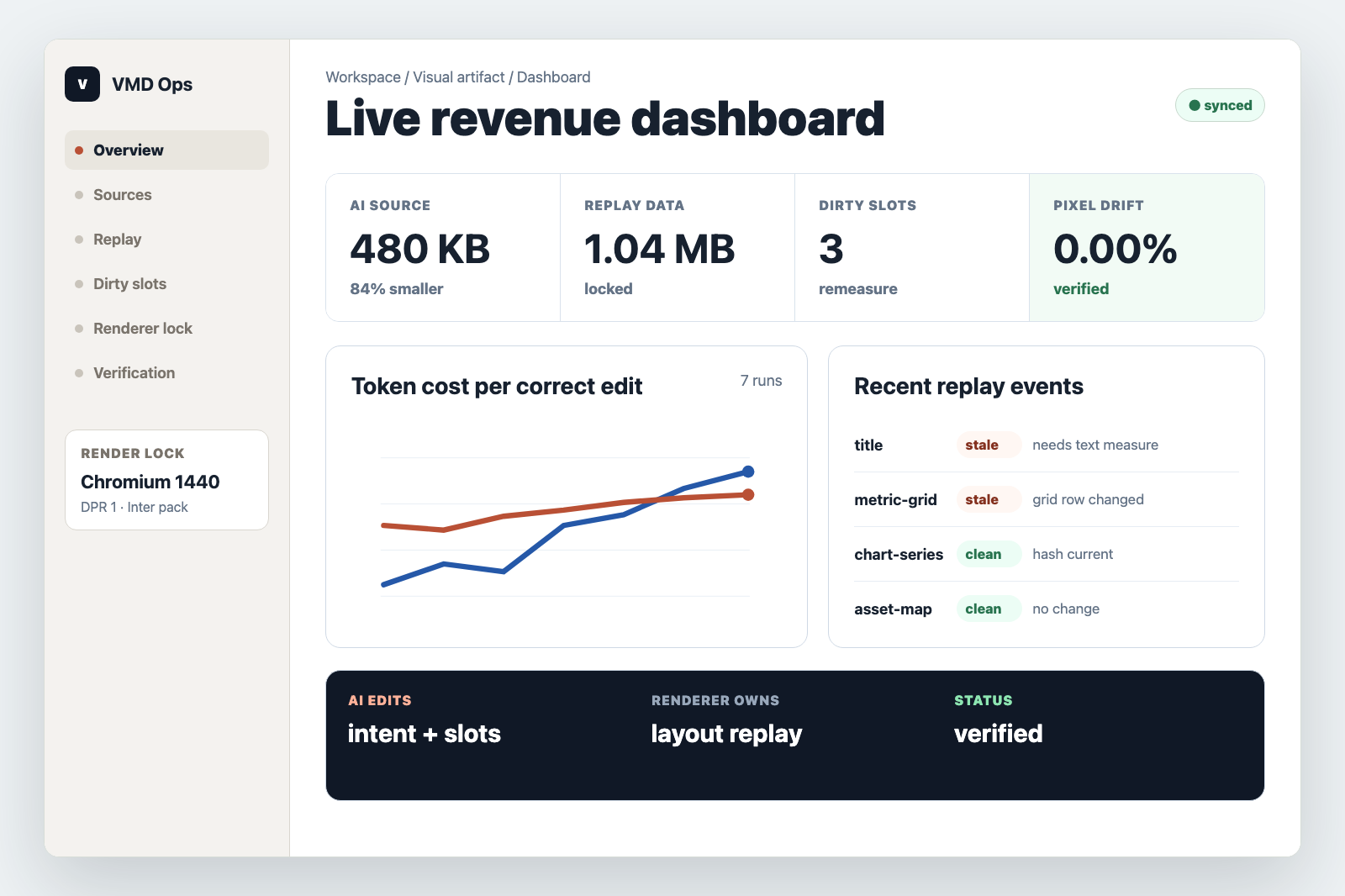
대시보드는 metric slot과 dirty-state 제약을 노출하고, 렌더러는 spacing, table, chart layout을 보존합니다.
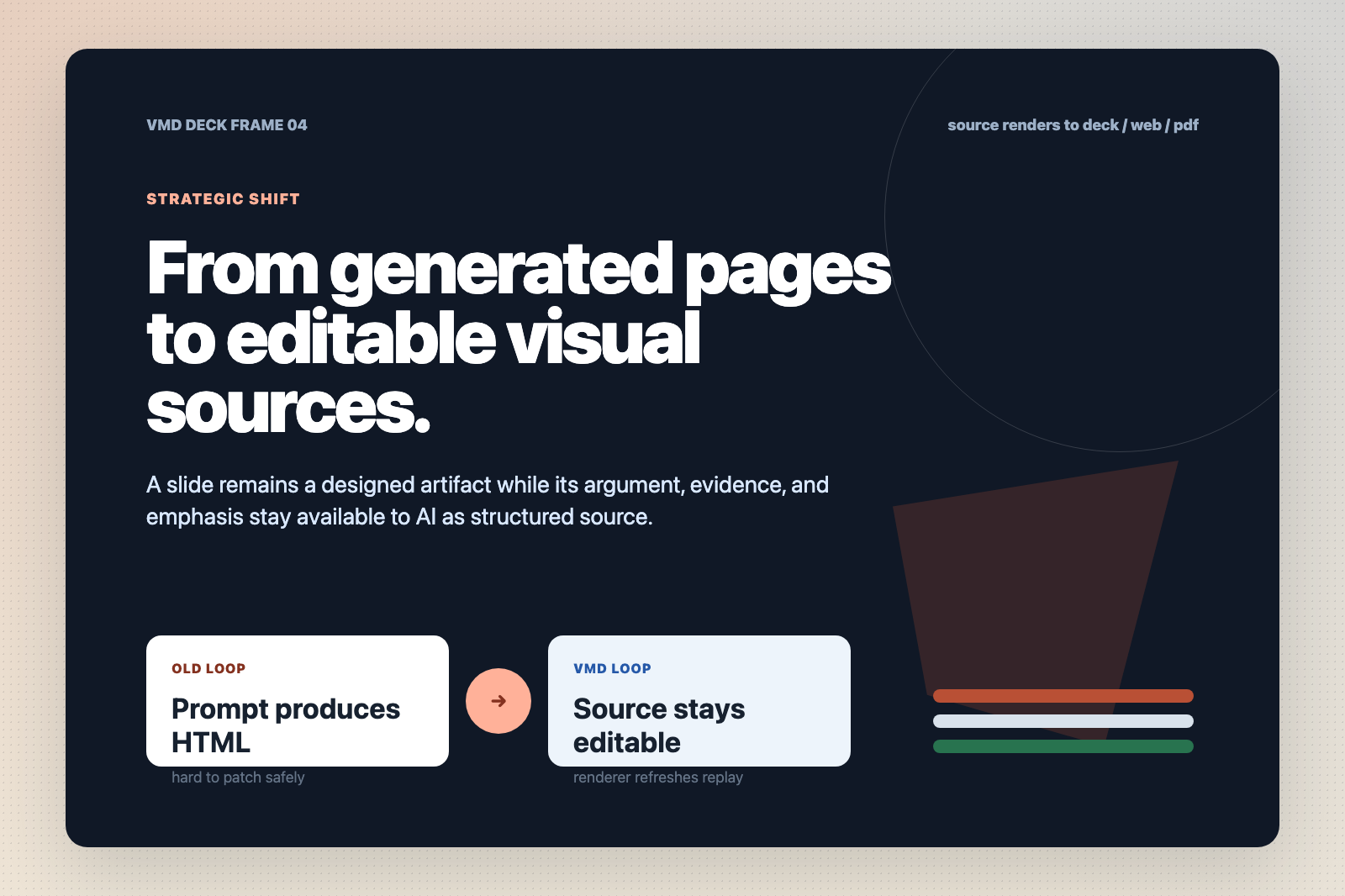
같은 source 개념은 slide frame에도 적용됩니다. AI는 논리를 고치고, 렌더러는 시각 시스템을 책임집니다.
포맷 계약
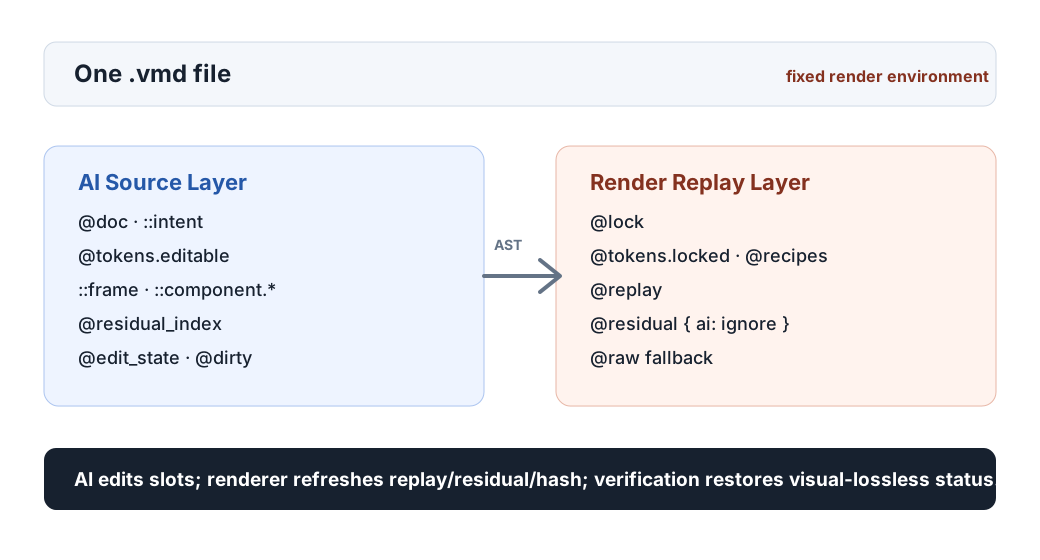
VMD는 HTML을 짧게 쓰는 표기가 아닙니다. AI는 작은 source layer를 편집하고, 렌더러는 비주얼 결과를 replay하는 데 필요한 데이터를 책임지는 분리 계약입니다.
모델이 적은 문맥으로 이해하고 패치할 수 있는 영역입니다.
렌더러가 원본 화면을 재현하기 위해 사용하는 영역입니다. 모델에게 구현 소음을 기억시키지 않습니다.
source 수정으로 replay가 stale이 되었는지 기록하고, 다시 검증해야 함을 드러냅니다.
편집 루프
완전 복원은 잠긴 source에 대해 필수입니다. AI가 source를 수정하면 stale replay를 감지하고 갱신한 뒤에야 다시 visual-lossless 상태를 주장할 수 있습니다.
수정 가능한 슬롯과 기존 비주얼 출력을 복원하는 데 필요한 replay 데이터를 함께 캡처합니다.
모델은 전체 브라우저 구현이 아니라 의미, 문구, 지표, 토큰, 컴포넌트 슬롯을 바꿉니다.
렌더러는 영향 영역을 dirty로 표시하고, 레이아웃을 다시 측정하고, residual과 hash를 갱신합니다.
pixel check와 DOM check를 통해 다시 visual-lossless라고 말할 수 있는지 판단합니다.
검증 방향
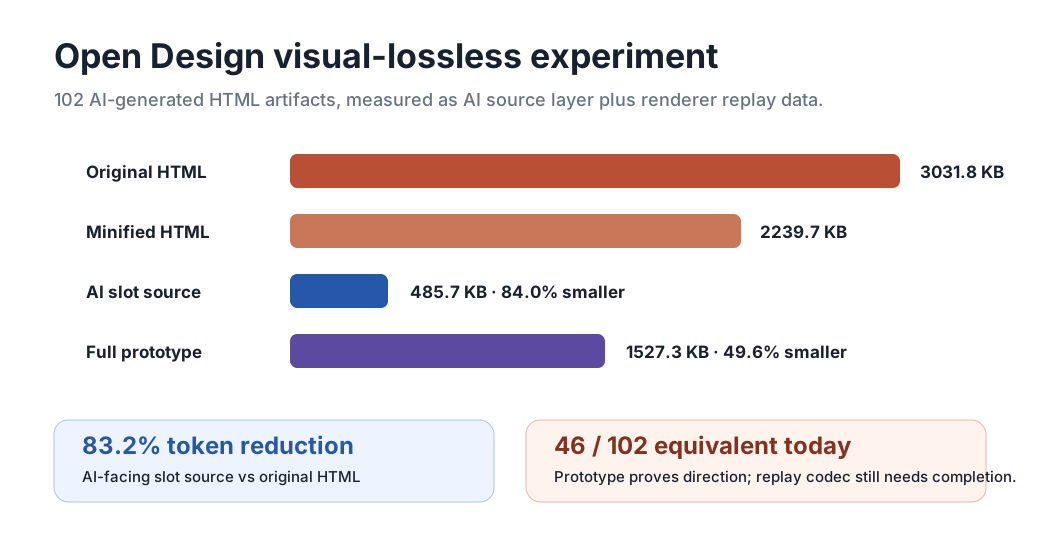
가장 작은 파일이 이기는 것이 아닙니다. AI가 읽고 수정할 source는 작아야 하고, 렌더러는 그 결과를 복원하고 수정 후 다시 갱신할 수 있어야 합니다.
레퍼런스 구현
공개 저장소에는 parser, renderer, CLI, Chrome extension, VS Code extension, packaging path, visual fidelity check가 들어 있습니다. 제안이 아니라 실제로 시험할 수 있는 포맷으로 다루기 위해서입니다.
브라우저 내장 지원 전에도 .vmd 파일을 Chrome에서 열고 source, diagnostics, render mode를 확인합니다.
snippet, syntax highlighting, validation, live preview, visual-lossless guardrail로 VMD를 작성합니다.
render, validate, gallery build, extension package, visual fidelity check를 반복 가능한 명령으로 실행합니다.
vmd validate samples/visual-lossless-dashboard.vmd --strict npm run test:chrome npm run verify:visual-fidelity -- --source-dir ./design-artifacts Public draft
목표는 AI 협업에 충분히 작고, 시각 복원에 충분히 엄격하며, 실제 문서 primitive가 될 만큼 열린 포맷입니다.